
72% NTSC or 99% sRGB vs 95% DCI-P3: Best TV Color Gamut?
Confused by color gamut percentages? Here’s how to understand them and compare displays like a pro.
If you have visited my article on wide color gamut, then you might be curious to know how the color gamut of a TV is defined.
There must be some parameter or standard which should describe the color gamut of a particular TV.
It should provide concrete information about which and how many colors a TV is capable of displaying.
In this article, we will discuss about the various types of color gamut and will finally figure out which is the best color gamut for your TV.
Let’s begin.
The CIE 1931 Color Space
CIE (Commission Internationale de l’éclairage) sets standards for colors. It has defined various color gamuts depending on the area of the visible spectrum covered by each of them.
The CIE 1931 color space is the base color space, which is created by mapping the human color vision, and thus represents all the colors that are visible to the human eyes.
It means that, if a TV can display all the colors present in this color space, the picture on it will appear the same as it is in reality.
Sadly, this doesn’t practically happen because our electronic displays aren’t that advanced to be capable of displaying all those colors.
But the good news is that they can display a portion of the visible color space, known as the color gamut of the display.
The colors which a TV can display depend on which particular portion of the color space it covers.
Each TV is specified with a certain percentage of a particular color gamut. Eg. 98% DCI-P3 or 100% Rec. 709.
Why do we see different colors on different TVs?
Suppose, a particular shade of red is not available in a TV’s color gamut.
Then, it will display the portion of the screen requiring that color slightly differently than a TV which actually has that particular shade of red.
Due to this, the color reproduction can be different on different TVs and you may see the same scene slightly differently on two TVs, although it is generally a very minute difference.
That said, it is quite possible that two TVs having the same color gamut do exactly the same color reproduction.
So, what’s the solution?
Some color standards should be properly defined so that a display can be designed with a particular color specification.
Consequently, various color gamuts, which refer to different areas covered in the visible color space were defined.
Wider and better color gamuts gradually kept on getting introduced as the technology advanced.
What are the various color gamuts?
Rec. 709, sRGB, Adobe RGB, NTSC, DCI-P3, Rec. 2020 and Rec. 2100 are the different color gamuts used by CIE as color standards for various devices.
Let’s quickly learn about these standards. Then we will be able to compare and decide which is the best color gamut.
Rec. 709
In 1993, the Rec. 709 color gamut was released by the ITU-R(International Telecommunication Union Radio Communication Sector). It is also known as BT.709 and ITU 709.
It has a coverage of 35.9% of the CIE 1931 color space. It is mainly a color standard for HD TVs and is compatible with the current HD technologies.
sRGB
In 1998, IEC created sRGB, which is also known as the standard Red Green Blue color gamut. It has about the same coverage of the color space as that of Rec. 709 and finds its uses in smartphones, TV screens, digital cameras, etc.
It can be said as a basic color gamut that is most widely used, as nearly all the displays can reproduce its colors.
Adobe RGB
In 1998, Adobe Inc. developed Adobe RGB color gamut which has 52.1% coverage of the CIE 1931 color space. It is widely used in the photography and video production business.
It offers a variety of colors, which are very useful for creating images and pictures.
NTSC
The color gamut of the National Television Standards Committee, NTSC, is 98% of the Adobe RGB color gamut. If you compare it to the sRGB color gamut, the whole sRGB covers 72% of the NTSC color gamut.
DCI-P3
DCI-P3 stands for Digital Cinema Initiatives-Protocal 3 and was developed by the Digital Cinema Initiatives in 2005. It has 53.6% coverage of the CIE 1931 color space.
It is a much-preferred color standard for modern TVs and displays richer colors with more depth.
Rec. 2020
Introduced by ITU in 2012, Rec. 2020 or BT.2020 is perhaps the widest color gamut till now which has 75.8% coverage of the CIE 1931 color space. It is the ideal color gamut for displaying 4K and Ultra HD content.
Many modern displays can display only about 60% of this color gamut. As it covers a significant portion of the overall visible color space, it is a technology for the future that can breathe life into every single detail.
Rec. 2100
Introduced by ITU in 2016, Rec. 2100 or BT.2100 is meant for HDR TVs. It has introduced HDR capabilities on the top of the Rec. 2020 color gamut.
Thus, it allows for a broader dynamic range with more luminance levels, making the picture quality more detailed and realistic, closer to what we see through our naked eyes.
Now, you can easily differentiate between the color gamuts mentioned in the specs sheets of displays. For example, 80% DCI-P3 has deeper, more saturated and more colors than the 100% sRGB color gamut.
What does % of color gamut mentioned in the display specs sheet mean?
Having the above color gamuts clearly defined, it might seem confusing that displays are advertised with specifications like “125% of sRGB” or “95% of DCI-P3.”
Why don’t manufacturers simply aim for exactly 100% of sRGB or 100% of DCI-P3 instead of landing somewhere above or below?
The reason is that display makers are not required to strictly adhere to these established standards when designing their panels.
They can tune their color performance independently, which means a display might cover a larger or smaller portion of a given color space rather than matching it precisely.
As a result, some displays exceed or fall short of these standard gamuts.
That being said, even when a display claims to cover 100% of sRGB, it doesn’t necessarily reproduce the exact same sRGB or Rec. 709 gamut.
The reason for this is the way in which the primary RGB colors of a particular color gamut align may differ, which in turn affects how hues appear and how saturated the colors look.
We will gain more clarity on taking some examples of display color specs for comparison.
72% NTSC vs 99% sRGB: Which is the better color gamut?
Looking only at percentages can be misleading. Although the entire sRGB color space amounts to about 72% of NTSC, that doesn’t mean a display rated at 100% sRGB has the same color gamut as one rated at 72% NTSC.
What really matters is which regions of the color space each standard includes.
To illustrate, imagine two circles and a triangle of equal area placed over different parts of a color space diagram.
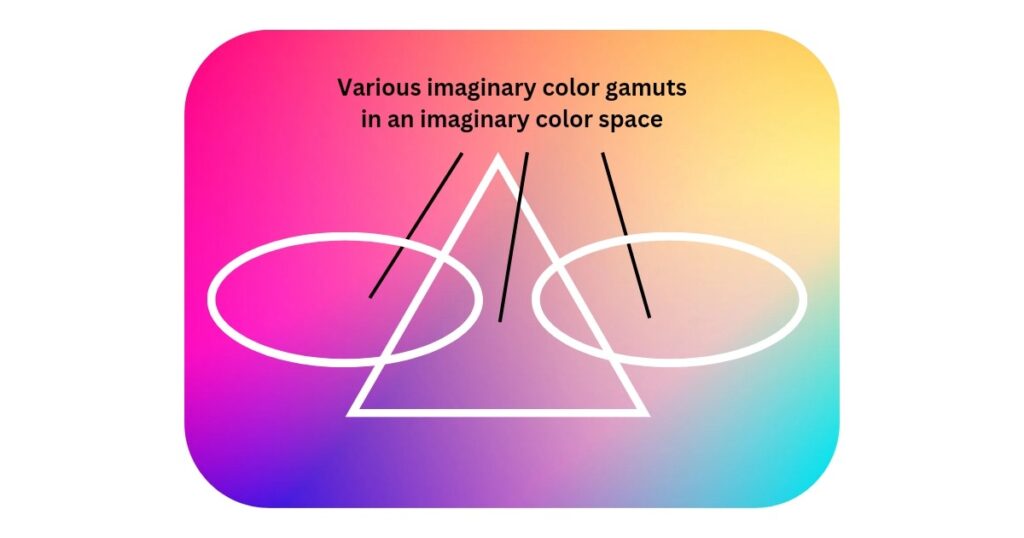
Even though their areas are identical, they would not represent the same color gamut because they cover different hues and levels of saturation.
This difference directly impacts how colors appear on a display.
In practice, when comparing sRGB and NTSC, sRGB does not extend as far into highly saturated hues as NTSC does, meaning it cannot reproduce some of the more vivid colors that NTSC can.
Let’s take another example to gain some more clarity into this.
Is 95% DCI P3 better than 99% sRGB?
The DCI-P3 and sRGB color gamuts cover roughly 53.6% and 35.9% of the CIE 1931 color space, respectively.
This means that 95% DCI-P3 coverage equals about 50.92% of the CIE 1931 spectrum (0.95 × 53.6), while 99% sRGB coverage corresponds to around 35.54% (0.99 × 35.9).
As a result, DCI-P3 offers a noticeably wider color gamut than sRGB.
The key distinction, however, is not just the size of the gamut but the range and richness of colors it can reproduce.
DCI-P3 supports 10-bit color depth, whereas sRGB is limited to 8-bit color depth, allowing DCI-P3 to display significantly more colors and smoother gradations.
It also delivers more vibrant, realistic, and accurate shades.
Because of this, watching movies or playing games on a display with DCI-P3 support provides a far more immersive visual experience compared to one limited to sRGB.
It’s now evident that a display’s color capability cannot be judged by merely knowing the percentage of a color gamut it covers.
However, understanding the unique characteristics of different color gamuts can help you make more informed decisions.
Rec. 2020 vs DCI-P3 vs Adobe RGB vs sRGB: Unique Features
I will jump to the conclusion on which is the best color gamut quickly. But before that, let’s know the peculiar features of various color gamuts:
- DCI-P3 supports 10-bit color depth, and thus, offers more vibrant and saturated colors than sRGB, which supports 8-bit color depth.
- Adobe RGB and DCI-P3 are comparable color gamuts and have better, more realistic and more colors than the sRGB color gamut. The main difference between Adobe RGB and DCI-P3 is that Adobe RGB excels in green and blue color reproduction, whereas DCI-P3 leans towards yellow and red. DCI-P3 is more suitable for watching movies and playing games.
- DCI-P3 is a wide color gamut vastly used for modern TVs owing to the reproduction of better color shades, i.e., bluer blues, redder reds, greener greens and good coverage of the CIE 1931 color space.
- Rec. 2020 covers nearly all the colors that can be seen through human eyes. It has 75.8% coverage of the CIE 1931 color space, whereas DCI-P3 and Rec. 709 have 53.6% and 35.9% coverage, respectively. Thus, it covers twice as many colors as Rec. 709 or sRGB, as well as 40% more colors than DCI-P3 or Adobe RGB or NTSC. It covers almost all the colors which the other above-mentioned color gamuts miss out on. Therefore, it is perhaps the widest color gamut to date.
- The Rec. 2020 is a wider and much better color gamut than DCI-P3. It covers all of what the DCI-P3 missed out, by excelling in the blue along with yellow and red and by covering a much larger area of the color space. This brings the picture true to life with vibrant and realistic colors.
Which is the best color gamut?
There is no single “best” color gamut, as the ideal choice also depends on your TV’s capabilities.
That said, if your TV offers strong HDR performance, wider color gamuts such as DCI-P3 or Rec. 2020 are the best options.
These gamuts enable the display to reproduce richer and more nuanced colors, bringing even subtle details to life.
That said, although Rec. 2020 is the widest color gamut but most of the modern displays aren’t able to achieve its significant coverage. Therefore, it can be called as the best future color gamut.
In today’s scenario, DCI-P3 remains the best and the most widely used color gamut for implementing a wide color gamut in modern displays.
What else affects the color gamut of a display?
A wide color gamut alone is not enough for a TV to reproduce every detail accurately. A TV also needs certain built-in capabilities to make colors appear vivid and life-like:
Contrast: A TV with a high contrast ratio delivers richer and more accurate colors compared to one with poor contrast. Strong contrast ensures that blacks look truly deep instead of appearing washed out or gray. For example, on an OLED TV, colors seem to glow against a perfectly black background, making every shade feel more vibrant and alive. Additionally, VA-based LCD TVs generally provide better contrast than IPS-based LCDs, which often results in superior color reproduction.
Peak Brightness: A TV with high peak brightness can produce a wider range of luminance levels, allowing colors to be displayed at their intended brightness. This makes the image look more vibrant and impactful on screen. After all, what’s the benefit in having an extremely wide color gamut if bright colors can’t be shown with proper intensity? A TV with high brightness and wide color gamut achieves better color volume and delivers more impactful HDR performance.
Yes https://tsn.ua
One other issue is that if you are in a scenario where you would not have a cosigner then you may really need to try to exhaust all of your school funding options. You can find many awards and other scholarships and grants that will present you with money to help you with school expenses. Many thanks for the post.