
Why do black bars appear on a TV screen? Aspect ratio explained.
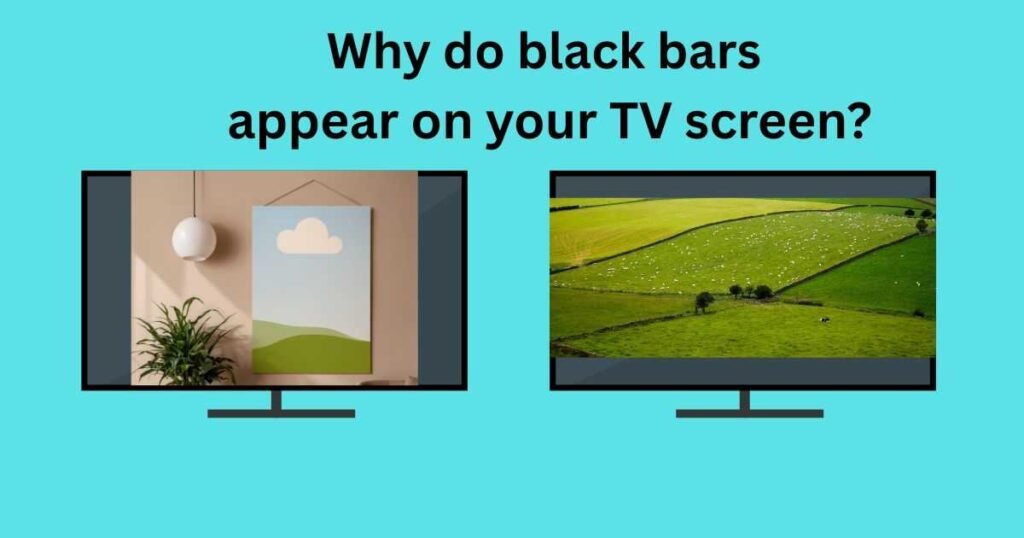
Have you ever noticed black bars appearing at the top and bottom, or sometimes on the sides of your TV screen?
These bars are usually the result of a mismatch between your TV’s aspect ratio and the aspect ratio of the content you’re watching.
While they can be distracting and slightly worsen the overall viewing experience, black bars aren’t actually a display fault.
In some cases, you might also notice that parts of the picture are cut off, especially when playing games or watching movies on a widescreen TV or monitor.
The good news is that you can often minimise or eliminate these issues by using content that’s designed for your TV’s aspect ratio.
So, what exactly is an aspect ratio, and why does it play such an important role in how content appears on your screen?
Let’s find out.
What is the aspect ratio of a TV screen?
Aspect ratio, in simple terms, is the ratio of a screen’s width to its height.
For example, a TV with a 16:9 aspect ratio means that for every 16 units of width, the screen has 9 units of height.
The units can be inches, centimetres, or any other unit of length, as long as the same unit is used for both dimensions.
The advertised size of a TV, such as 55 inches, refers to its diagonal measurement rather than its width or height.
If a 55-inch TV has a 16:9 aspect ratio, we can determine its actual dimensions as follows:
(16x)^2+(9x)^2= 55^2= 3025
Solving this equation gives the scaling factor x, which allows us to calculate the screen’s dimensions.
The width comes to be approximately 48 inches, and the height is approximately 27 inches.
As expected, the ratio of these dimensions is 16:9.
How does aspect ratio affect resolution?
It is important to clarify between aspect ratio and resolution, and know if they affect each other.
Resolution of a TV is the total number of pixels displayed horizontally and vertically on its screen.
Pixels are tiny, identical picture elements that collectively form the image to be displayed on the screen.
For a given resolution, a wider or taller aspect ratio, whatever applicable, contains more pixels.
For instance, 4K resolution indicates that the horizontal pixel count is approximately 4,000.
The most common 4K resolution is 3840 × 2160, which has a 16:9 aspect ratio, what we widely refer to as standard 4K.
Similarly, the standard 8K resolution, 7680 × 4320, also uses a 16:9 aspect ratio.
However, 4K or 8K is not limited to one specific type of pixel configuration.
Any resolution with a horizontal pixel count close to 4,000 may be classified as 4K resolution, depending on its aspect ratio.
For instance, 4096 × 2160 is also considered a 4K resolution, but it has an aspect ratio of approximately 1.9:1 (commonly written as 17:9).
Now, if we increase the vertical pixel count to 2304 while keeping the horizontal count at 4096, the resulting resolution, 4096 × 2304, again has a 16:9 aspect ratio and is another example of a 4K resolution.
Commonly used aspect ratios
Have you ever wondered why videos on Instagram look different from those on your TV?
The reason lies in the aspect ratio used for different types of content.
Various media platforms adopt different aspect ratios depending on their purpose and visual appeal.
For example, social media platforms commonly use a 1:1 (square) aspect ratio, which makes videos appear square-shaped and well-suited for mobile viewing.
While square (1:1) is common for posts, many platforms now also support 9:16 (vertical) for reels, shorts, and stories, which has become the dominant format for mobile video.
In contrast, most TV programmes and movies are produced in the 16:9 aspect ratio, the standard format for modern displays.
Gaming monitors, however, often feature ultra-wide aspect ratios such as 21:9, providing a much wider field of view than the standard 16:9 format.
Since a 21:9 (2.33:1) display is considerably wider than a 16:9 (1.78:1) display, it offers a more immersive visual experience, particularly for gaming and cinematic content.
Why do black bars appear on a TV screen?
The black bars that appear either on the sides of the screen or at the top and bottom are caused by a mismatch between the aspect ratio of the TV and that of the content being displayed.
When the content’s aspect ratio does not match the TV’s screen ratio, the TV displays black bars in order to preserve the original image without stretching, cropping, or distorting it.
Black bars on the sides
Play an Instagram video on a TV. You will notice that, instead of filling the entire screen, the video occupies only the central portion, leaving black bars on both sides.
This occurs because most social media videos are created in a 1:1 (square) aspect ratio, whereas modern TVs typically use a 16:9 (widescreen) aspect ratio.
If the square video were stretched to fill the full width of a 16:9 television, its height would also increase proportionally, causing the top and bottom portions of the image to extend beyond the screen and be cropped.
To avoid losing any part of the original content, the television preserves the video’s aspect ratio by fitting its height within the screen.
As a result, the video occupies only the central area, and the unused space on the left and right appears as black bars.
This effect is known as pillarboxing.
For the same reason, smartphones, which generally have display aspect ratios closer to those used for social media content, especially vertical or square formats, can display such videos more effectively, allowing them to occupy a larger portion of the screen with little or no unused space.
Black bars on top and bottom
Now, try playing a game that is designed for an ultra-wide 21:9 aspect ratio on a standard 16:9 television.
Since the game is significantly wider than the TV screen, displaying it across the full width of the television would result in the left and right edges of the image being cropped.
To preserve the entire picture, the TV fits the width of the game exactly within its screen.
When the 21-unit width of the game is reduced to match the TV’s 16-unit width, the corresponding height decreases proportionally from 9 units to approximately 6.9 units.
As a result, the image no longer occupies the full height of the television, leaving unused space at the top and bottom.
These empty areas appear as black bars, a phenomenon known as letterboxing.
An ultra-wide gaming monitor with a 21:9 aspect ratio can display the same game across the entire screen without cropping the image or adding black bars.
Therefore, for the best viewing experience, the aspect ratio of the display should match the aspect ratio of the content being viewed.
When both are compatible, the image is displayed as intended, without distortion, cropping, or unused screen space.
Conclusion
For an image to fill the screen without any visible black bars, the aspect ratio of the content should match the aspect ratio of the display.
Many televisions and monitors include built-in display settings that can stretch, zoom, or compress the image to fit the screen even when the aspect ratios differ.
However, these adjustments may distort the picture, crop important parts of the image, or reduce the overall viewing quality.
But, this is rarely an issue as long as the content is viewed on a display designed for its intended aspect ratio.
In other words, the aspect ratios of both the content and the display should be compatible.
When they are in harmony, the content is presented accurately, without distortion, cropping, or unnecessary black bars, resulting in the best possible viewing experience.