24p vs 25p Judder, 3:2 Pulldown, Judder vs Stutter On TV
Do you start stuttering when the trees outside are juddering in a storm?
Just kidding!
In this article, we’re going to break down what TV judder actually is and why it happens.
We’ll also talk about what makes a TV stutter.
We’ll know what is 24p judder and 3:2 pulldown.
We’ll wrap it up by highlighting the differences between judder and stutter.
Let’s jump in!
Why Frame Rate Is The Root Of All?
Most of the time, the video you’re watching may have a lower frame rate than your TV’s refresh rate, and that mismatch can cause issues.
For example, if you’re watching on a 60 Hz TV, which refreshes the screen 60 times every second, the content you play might only be 30 fps (like many news channels) or 24 fps (like most movies).
When that happens, the picture quality can take a hit because of two things: stutter and judder.
Let’s break down what each of them really means.
What Is Stutter On TV & What Causes It?
Stuttering happens when the video frames you’re getting from the source take too longer to update on the screen than the TV’s pixels take to respond.
On a fast TV, the pixels switch almost instantly, but the frames themselves stay stuck on the screen for quite a while.
For example, 24 fps content holds each frame for about 41.7 ms, and 30 fps content holds each frame for about 33.3 ms.
Meanwhile, the TV’s response time might be just 5 ms.
So the pixels are changing super quickly, but the actual frames are showing up in chunky steps.
That mismatch creates stutter and makes motion look less smooth.
With 30 fps content on a 60 Hz TV, the TV usually just doubles each frame to match the refresh rate—30 frames take 60 “time slots,” each lasting 1/60 of a second.
That means every frame sits on the screen for two refresh cycles of the TV.
The TV basically refreshes once with the same frame and then with the next one.
On a 120 Hz TV, each frame lasts even longer because it gets stretched across four 1/120 second slots.
That can make stutter even more noticeable.
Still, in all these cases, the refresh rate (60 or 120 Hz) is at least a clean multiple of the content’s frame rate, which avoids more issues like judder.
Stutter In OLED vs LCD
OLED TVs have insanely fast response times, their pixels can switch colors in about 0.1 ms.
But when you feed them low–frame rate content like 24 fps or 30 fps, the frames don’t update fast enough to keep up with those super-quick pixels.
That mismatch leads to noticeable stutter.
LCD TVs, on the other hand, usually have response times around 8–12 ms, which actually makes them a bit more forgiving with low-fps content.
Since OLEDs refresh their pixels almost instantly, they end up “waiting” much longer for the next frame to show up.
That’s why OLED TVs tend to show more stuttering with low-frame rate videos compared to LCD TVs.
How Can Stutter Be Removed?
You can get rid of stutter on a TV when the video’s frame rate matches the TV’s refresh rate.
TVs usually do this using frame interpolation, where they “guess” what should happen between two frames and create an extra one in between.
This boosts the frame rate so it lines up with the refresh rate.
It definitely smoothens things out, but it can also lead to that weird soap-opera effect in which the scenes start appearing too realistic instead of the cinematic slightly lower frame rate content.
What Is Judder On TV & What causes It?
Judder is that uneven, jerky motion you sometimes see on a TV, and it happens when the TV’s refresh rate neither lines up with the video’s frame rate nor is an exact multiple of the same.
Movies are usually shot at 24 fps, but if you play them on a 60 Hz TV, things don’t line up cleanly because 60 isn’t an exact multiple of 24.
That mismatch causes what’s called 24p judder.
To deal with this, the TV uses a technique called 3:2 pulldown, where it repeats frames in a certain pattern to cause the 24 fps video to fit into a 60 Hz refresh cycle.
What Is 3:2 Pulldown On TV?
This technique is what a TV uses to match a video’s frame rate to its refresh rate when the numbers don’t divide evenly, like trying to fit 24 fps content into a 60 Hz TV.
Since 60 isn’t a multiple of 24, the TV can’t just show each frame twice or three times, because that would give you 48 fps or 72 fps, neither of which matches 60.
So instead, the TV mixes it up: it shows one frame 3 times and the next frame 2 times.
In other words, over 5 refresh slots, you get 2 video frames, one stretched across 3 slots and the other across 2.
Repeat this pattern and 24 frames fit perfectly into 60 refresh cycles.
Usually, the odd-numbered frames get shown 3 times and the even ones 2 times.
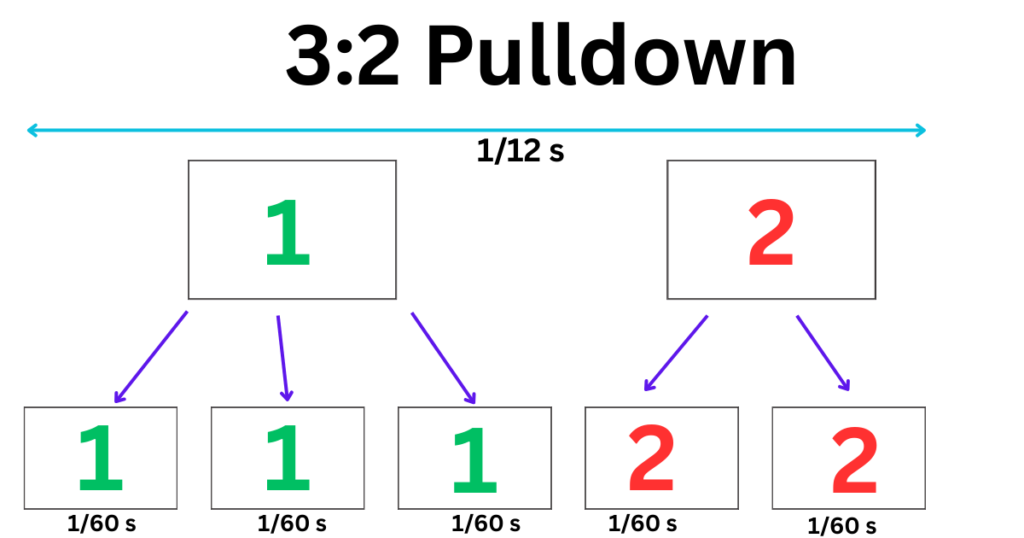
But this uneven holding time is exactly what creates judder, as the frames shown for longer (the “3-repeat” ones) look like they move slower than the ones shown twice.
The result is that jerky, uneven motion.
If you play the same 24 fps content on a 120 Hz TV, though, each frame can be shown evenly 5 times because 120 is a multiple of 24.
That eliminates judder, although you might still see stutter on the display due to the low frame rate of the content.
How Can Judder Be Removed?
Judder can be fixed if the TV supports variable refresh rate (VRR).
With VRR, the TV can adjust its refresh rate in such a way that it becomes a clean multiple of the content’s frame rate.
For example, normally a 60 Hz TV can’t smoothly show 24 fps content because 60 isn’t a multiple of 24, leading to that 3:2 pulldown technique and the judder problem that comes with it.
But if the TV supports VRR and can go up to 120 Hz, it simply bumps its refresh rate to 120. Since 120 is a perfect multiple of 24, the TV can display each frame evenly using a 5:5 pulldown.
Every frame stays on the screen for the same amount of time, which gets rid of the uneven motion, so the judder disappears.
24p vs 25p Judder
If you play 24 fps content on a TV with VRR, the TV can get rid of judder by bumping its refresh rate up to a clean multiple of 24, usually 120 Hz.
But there’s the problem: if the content is 25 fps, the TV will almost always run into judder because most TVs don’t support refresh rates that are multiples of 25, like 50 Hz or 100 Hz.
So while 24p judder can be fixed, 25p judder is usually something you just have to live with.
Stutter vs Judder
Stutter happens when the video’s frame rate is just too low, making motion look rough or choppy.
Judder, on the other hand, is that uneven, jerky motion you see when the TV’s refresh rate isn’t a clean multiple of the video’s frame rate.
These two issues can show up together or separately.
For example, if you watch 24 fps content on a 60 Hz TV, you’ll probably see both stutter and judder.
But if you play the same 24 fps video on a 120 Hz TV, the judder goes away and only the stutter usually remains.
Conclusion
In this article, we discussed stutter and judder, what causes them, and the ways to fix them.
We also looked at how 3:2 pulldown helps deal with 24p judder.
Overall, it’s a good idea to get a TV with variable refresh rate so it can adjust its refresh rate to match, or at least become a clean multiple of the content’s frame rate.
It’s also helpful if the TV has frame interpolation, which boosts the frame rate of the content to line up with the TV’s refresh rate.
If a TV has both VRR and frame interpolation features, you are very less likely to encounter the problems of judder and stutter.